
Adding balance to a Sandbox account
In the Sandbox, you can simulate a balance to test operations that depend on funds available in the account, such as transfers, payments, and anticipations.
Since the environment does not move real money, the balance is generated by confirming a test charge.
By the end of this guide, you will have confirmed a charge and made a balance available to run financial tests in the Sandbox.
When to use it
Add balance when you need to test:
- Pix transfers;
- transfers between Asaas accounts;
- bill payments;
- anticipations;
- balance and statement queries;
- other operations that require an available balance.
How it works
The recommended flow is:
Create customer
      ↓
Create charge
via Pix or bank slip (boleto)
      ↓
Confirm payment
      ↓
Balance made available
      ↓
Run the tests
1. Create a customer
Register a test customer to link to the charge.
See the Create a customer guide.
2. Create a charge
Create a charge using one of these payment methods:
PIX;BOLETO.
After creation, the charge will be available for confirmation in the Sandbox.
3. Confirm the payment
In the Sandbox interface, open the charge and click the option to confirm the payment.
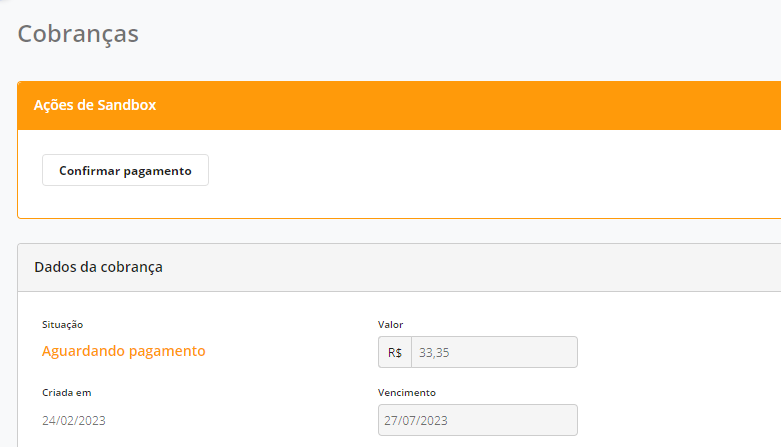
After confirmation, the amount will be added to the Sandbox account balance.
The confirmation is a simulation.
No financial institution is contacted and no real money is moved.
Example
To test a Pix transfer of R$ 500:
- Create a test customer.
- Generate a Pix charge of R$ 500.
- Confirm the payment.
- Use the available balance to make the transfer.
Confirm through the API
In Sandbox scenarios with subaccounts, you can also confirm the payment through the API.
See Sandbox Actions to:
- confirm a charge payment;
- force a charge to become overdue.
If the button does not appear
Check that:
- the charge was created in the Sandbox;
- the payment method is Pix or bank slip (boleto);
- the charge has not yet been confirmed;
- the current status allows confirmation.
Best practices
- use only data intended for testing;
- generate only the balance needed for the scenario;
- validate Webhooks and status changes after confirmation;
- do not treat Sandbox behavior as a guarantee of availability in Production.
Next steps
After adding balance, you can test:
Updated 11 days ago