
Polling vs. Webhooks
Why is it better to use Webhooks?
Polling and Webhooks both let you track changes to API resources, but they serve different needs.
To track state changes continuously, prefer Webhooks. Use GET requests when you need to retrieve the current state of a resource on demand.
Which approach should you use?
| Need | Recommended approach |
|---|---|
| Know when a resource changed | Webhook |
| Run an action when an event occurs | Webhook |
| Keep systems in sync | Webhook |
| Check the current state of a resource | GET |
| Perform a one-off query | GET |
| Retrieve information for verification | GET |
Polling
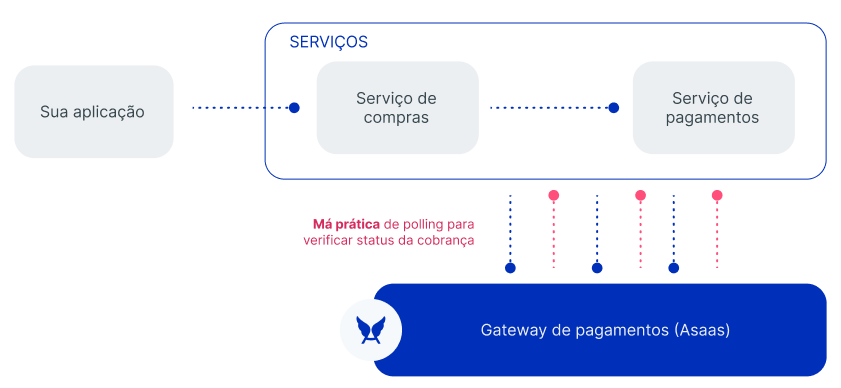
With polling, your application repeatedly queries the API until it identifies a change in the resource.
For a charge, for example, the application may query the payment until it finds the expected state.
Polling flow
%%{init: {"flowchart": {"nodeSpacing": 18,"rankSpacing": 24,"diagramPadding": 4,"padding": 7}}}%%
flowchart TD
    A["Create the charge"] --> B["Query the charge"]
    B --> C{"Payment confirmed?"}

    C --> CSim(("Yes"))
    C --> CNao(("No"))

    CSim --> D["Update the application"]
    CNao --> E["Wait for the next interval"]
    E --> B

    classDef inicio fill:#DBEAFE,stroke:#2563EB,color:#1E3A8A,stroke-width:3px
    classDef decisao fill:#FEF3C7,stroke:#D97706,color:#78350F,stroke-width:3px
    classDef validacao fill:#E0F2FE,stroke:#0284C7,color:#0C4A6E,stroke-width:2px
    classDef sucesso fill:#DCFCE7,stroke:#16A34A,color:#14532D,stroke-width:3px

    classDef respostaSim fill:#22C55E,stroke:#15803D,color:#FFFFFF,stroke-width:3px
    classDef respostaNao fill:#EF4444,stroke:#B91C1C,color:#FFFFFF,stroke-width:3px

    class A inicio
    class C decisao
    class B,E validacao
    class D sucesso

    class CSim respostaSim
    class CNao respostaNao

    linkStyle default stroke:#94A3B8,stroke-width:2px
    linkStyle 2 stroke:#22C55E,stroke-width:4px
    linkStyle 3 stroke:#EF4444,stroke-width:4px
The shorter the interval between queries, the greater the number of requests made.
Frequent polling also consumes the API limits and may result in HTTP 429 Too Many Requests when those limits are reached.
Webhooks
With Webhooks, your application does not need to repeatedly query the API to find out whether an event occurred.
When a configured event occurs, Asaas sends a POST request to your application's endpoint.

Webhook flow
%%{init: {"flowchart": {"nodeSpacing": 18,"rankSpacing": 24,"diagramPadding": 4,"padding": 7}}}%%
flowchart TD
    A["Create the charge"] --> B["Wait for the event"]
    B --> C["Receive the Webhook"]
    C --> D["Persist the event"]
    D --> E["Respond HTTP 200"]
    E --> F["Update the application"]

    classDef inicio fill:#DBEAFE,stroke:#2563EB,color:#1E3A8A,stroke-width:3px
    classDef validacao fill:#E0F2FE,stroke:#0284C7,color:#0C4A6E,stroke-width:2px
    classDef sucesso fill:#DCFCE7,stroke:#16A34A,color:#14532D,stroke-width:3px

    class A inicio
    class B,C,D,E validacao
    class F sucesso

    linkStyle default stroke:#94A3B8,stroke-width:2px
Endpoint example
POST https://api.exemplo.com/webhooks/asaasPayload example
{
  "id": "evt_05b708f961d739ea7eba7e4db318f621",
  "event": "PAYMENT_RECEIVED",
  "payment": {
    "id": "pay_080225913252"
  }
}
What to consider when using Webhooks
| Behavior | How to handle it |
|---|---|
| Delivery method | Receive POST requests |
| Expected response | Return HTTP 200 |
| Timeout | Respond within 10 seconds |
| Delivery model | Assume the same event may be sent more than once |
| Communication failure | Be prepared for retries |
| Authentication | Validate asaas-access-token when using authToken |
Since delivery follows the at least once model, use the event id to implement idempotence.
See how to implement idempotence in Webhooks.
RecommendedDo not use polling as the main mechanism to track state changes when a corresponding Webhook event exists.
Use Webhooks to receive the change and
GETrequests when you need to retrieve the current state of the resource.
Next steps
Updated 15 days ago