
Send types
The send type defines whether Asaas must preserve the order of events or allow parallel deliveries.
Choose this setting according to the dependency between the events processed by your application.
Compare the send types
| Characteristic | Sequential | Non-Sequential |
|---|---|---|
sendType | SEQUENTIALLY | NON_SEQUENTIALLY |
| Event order | Preserved | Not guaranteed |
| Delivery | Each event respects the sequence of the previous ones | Events can be sent simultaneously |
| Throughput | Lower | Higher |
| Use when | Order is part of the integration logic | Events can be processed independently |
%%{init: {"flowchart": {"nodeSpacing": 28,"rankSpacing": 32,"diagramPadding": 8,"padding": 10}}}%%
flowchart TD
    A["Define the Webhook logic"] --> B{"Is event order required?"}

    B --> BSim(("Yes"))
    B --> BNao(("No"))

    BSim --> C["Use SEQUENTIALLY"]
    BNao --> D["Use NON_SEQUENTIALLY"]

    C --> E["Configure the Webhook"]
    D --> E

    classDef inicio fill:#DBEAFE,stroke:#2563EB,color:#1E3A8A,stroke-width:3px,font-size:17px
    classDef decisao fill:#FEF3C7,stroke:#D97706,color:#78350F,stroke-width:3px,font-size:17px
    classDef validacao fill:#E0F2FE,stroke:#0284C7,color:#0C4A6E,stroke-width:2px,font-size:17px
    classDef sucesso fill:#DCFCE7,stroke:#16A34A,color:#14532D,stroke-width:3px,font-size:17px
    classDef respostaSim fill:#22C55E,stroke:#15803D,color:#FFFFFF,stroke-width:3px,font-size:16px
    classDef respostaNao fill:#EF4444,stroke:#B91C1C,color:#FFFFFF,stroke-width:3px,font-size:16px

    class A inicio
    class B decisao
    class C,D validacao
    class E sucesso

    class BSim respostaSim
    class BNao respostaNao

    linkStyle default stroke:#94A3B8,stroke-width:2px
    linkStyle 1 stroke:#22C55E,stroke-width:4px
    linkStyle 2 stroke:#EF4444,stroke-width:4px
Sequential delivery
Use SEQUENTIALLY when the application needs to receive events in the order in which they occurred.
This behavior is suitable for journeys in which one event depends on the state produced by the previous event.
Charge example
A charge received after its due date may generate this sequence:
%%{init: {"flowchart": {"nodeSpacing": 28,"rankSpacing": 32,"diagramPadding": 8,"padding": 10}}}%%
flowchart TD
    A["PAYMENT_CREATED"] --> B["PAYMENT_OVERDUE"]
    B --> C["PAYMENT_CONFIRMED"]
    C --> D["PAYMENT_RECEIVED"]

    classDef inicio fill:#DBEAFE,stroke:#2563EB,color:#1E3A8A,stroke-width:3px,font-size:17px
    classDef validacao fill:#E0F2FE,stroke:#0284C7,color:#0C4A6E,stroke-width:2px,font-size:17px
    classDef sucesso fill:#DCFCE7,stroke:#16A34A,color:#14532D,stroke-width:3px,font-size:17px

    class A inicio
    class B,C validacao
    class D sucesso

    linkStyle default stroke:#94A3B8,stroke-width:2px
In this scenario, preserving the order lets you identify that the payment occurred after the due date.
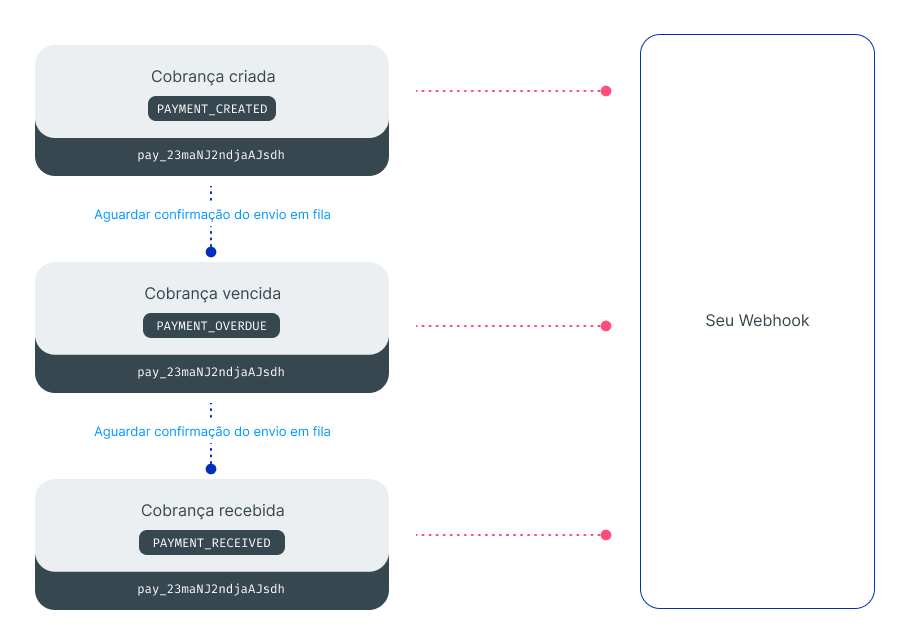
With Sequential delivery, a slow or failed event may delay the following events. Use this type when preserving order is necessary for the application logic.
Non-Sequential delivery
Use NON_SEQUENTIALLY when events can be handled regardless of the order in which they are received.
In this mode, Asaas does not need to wait for previous events to complete before making new deliveries. Notifications may be delivered simultaneously and arrive out of the order in which they occurred.

This behavior is recommended for high-volume integrations, parallel processing, or events that do not depend on the state produced by previous notifications.
If you use this send type, do not base your business rule on the order in which requests arrive.
Behavior common to both types
Regardless of the sendType, Webhooks follow the at least once model. The same event may be sent more than once, keeping the same id.
Your application must:
- persist the event using
idas a unique identifier; - respond
HTTP 200after confirming persistence; - process the business rule asynchronously.
Idempotence is necessary for both Sequential and Non-Sequential delivery. Sequential delivery preserves the delivery order, but it does not prevent redeliveries.
See how to implement idempotence in Webhooks.
Next steps
Updated 23 days ago