
Automatic Pix
Automatic Pix is an innovative solution that enables fully automated payment of recurring charges. This method makes your customers' routine easier because, once the charge is authorized, future payments occur without the payer having to take manual action for each new transaction.
Feature with controlled accessTo enable Automatic Pix in your account, contact our Integration Success team by email at [email protected].
Payment journey
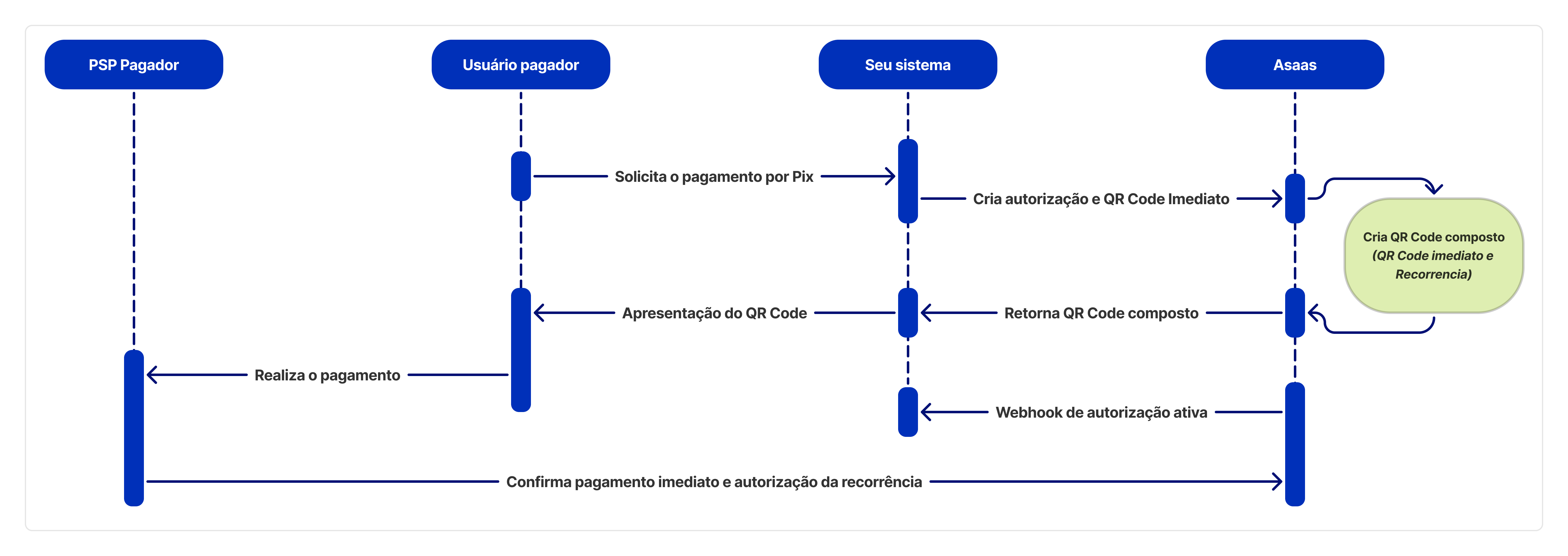
The Automatic Pix integration flow in Asaas is centered on Journey 3, where consent for the recurrence is obtained with the payment of the first installment.
In this journey, the generated QR Code contains both the data for the first payment (which is made immediately) and the data needed to set up future recurring payments.
First payment flow
Recurring payments flow
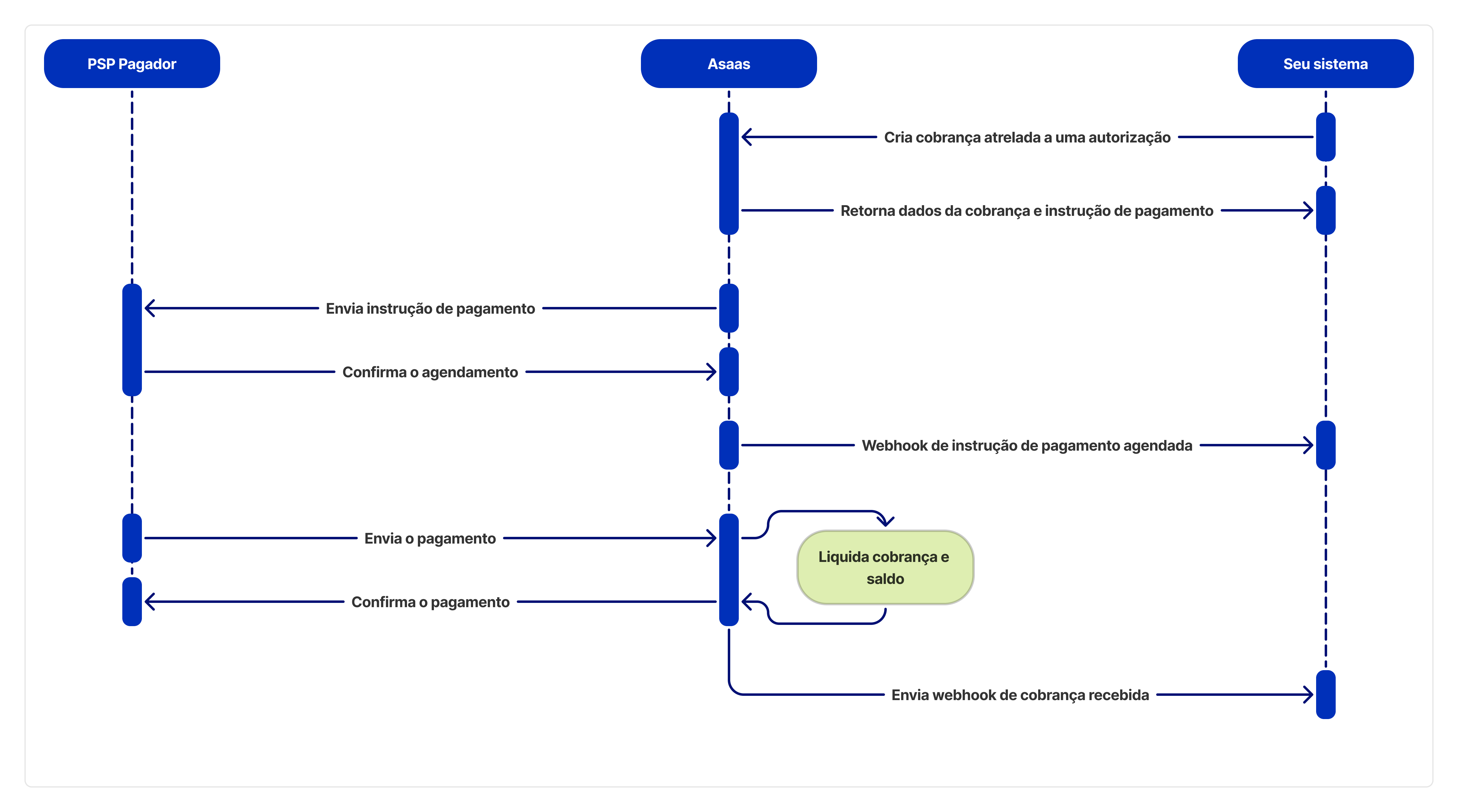
The process comes down to the following steps:
- Integrated QR Code generation: Your application asks Asaas to create a recurrence authorization. The API returns a composite QR Code.
- Authorization by the payer: The end customer scans the QR Code, authorizes the immediate payment and, in the same flow, consents to future debits.
- Initial payment: The first payment is settled as a traditional Pix.
- Recurrence activation: Once the first payment succeeds, the recurrence authorization is activated.
- Future charges: Your application starts creating future charges in Asaas, which sends the payment instructions to be automatically debited from the payer's account.
Implementation
Create an authorization with an immediate QR Code
Creating the authorization is the first step. You will call our API to generate a QR Code that already contains the data for the first charge and the recurrence authorization.
See the full endpoint reference: Create an authorization
When you call this endpoint, a "copy and paste" code (payload) will be generated, which must be presented to your customer (the payer).
In the call's response, the immediateQrCode field will come with a conciliationIdentifier. This same identifier will be included in the corresponding charge when the payment is settled, allowing you to securely reconcile the original authorization with the payment.
You will also receive the authorization id. Store this id, as it will be essential for creating future charges and tracking webhooks.
Track the authorization status via webhooks
After the payer consents, Asaas will notify your application via webhook. It is essential that you configure your system to receive these events.
The authorization events you should listen to are:
PIX_AUTOMATIC_RECURRING_AUTHORIZATION_CREATED: Reports that the authorization was requested.
PIX_AUTOMATIC_RECURRING_AUTHORIZATION_ACTIVATED: Confirms that the payer consented and you can now create future charges.
PIX_AUTOMATIC_RECURRING_AUTHORIZATION_CANCELLED: Reports that the authorization was canceled.
PIX_AUTOMATIC_RECURRING_AUTHORIZATION_EXPIRED: Reports that the authorization expired because the payment was not made within the QR Code's set time.
PIX_AUTOMATIC_RECURRING_AUTHORIZATION_REFUSED: Reports that the authorization was refused by the destination bank.
Webhook payload example
{
  "event": "PIX_AUTOMATIC_RECURRING_AUTHORIZATION_ACTIVATED",
  "authorization": {
    "id": "d51008fa-e28e-4823-82b4-4b1fcf485229",
    "status": "ACTIVE",
    "customerId": "cus_000006869125",
    "frequency": "MONTHLY",
    "value": 2.00,
    "startDate": "2025-08-01",
    "finishDate": "2028-01-01",
    "immediateQrCode": {
      "conciliationIdentifier": "ASAAS000000000000000000000000550ASA",
      "expirationDate": "2025-07-24 18:00:20"
    }
  }
}
Create the recurring charges
With the authorization in ACTIVE status, your application can start creating the periodic charges in Asaas. The debit will be made automatically from the payer's account on the due date.
To do this, use the payment creation API, providing the new pixAutomaticAuthorizationId field in the main object, with the authorization identifier obtained in the first step.
See the full endpoint reference: Create charge with Automatic Pix
Interval before the due dateThe payment instruction must be created between 2 and 10 business days before the charge's due date. If your application tries to generate the charge outside this window, the API will return an exception.
Track the charge status via webhooks
For each charge created, Asaas will send a payment instruction to the payer's PSP. You can track the status of this instruction through specific webhooks.
The payment instruction events are:
PIX_AUTOMATIC_RECURRING_PAYMENT_INSTRUCTION_CREATED: Instruction created.
PIX_AUTOMATIC_RECURRING_PAYMENT_INSTRUCTION_SCHEDULED: The transaction was successfully scheduled in the payer's account.
PIX_AUTOMATIC_RECURRING_PAYMENT_INSTRUCTION_REFUSED: The payer refused the debit instruction.
PIX_AUTOMATIC_RECURRING_PAYMENT_INSTRUCTION_CANCELLED: The instruction was canceled.
In addition to these, you will also receive the traditional payment webhooks (PAYMENT_RECEIVED, PAYMENT_OVERDUE, etc.) when the payment is completed.
Webhook payload example
{
  "event": "PIX_AUTOMATIC_RECURRING_PAYMENT_INSTRUCTION_SCHEDULED",
  "paymentInstruction": {
    "id": "f6559451-cb41-4ec6-8487-2cda59a5f184",
    "status": "SCHEDULED",
    "dueDate": "2024-10-04",
    "payment": "pay_080225913252",
    "authorization": {
      "id": "c6b180f0-2196-454c-ac7e-72d662286bd1"
    }
  }
}
Managing authorizations
You can also query and cancel Automatic Pix authorizations via the API.
To list or query authorizations:
See the full endpoint reference: List authorizations and Retrieve a single authorization
To cancel an authorization:
See the full endpoint reference: Cancel an authorization
Updated 4 days ago