
Shopify general settings
⚙️ Asaas + Shopify integration
After installing the Asaas Apps on Shopify, validate two settings before processing payments:
- the customer contact method, required for Credit Card;
- the environment used by the app, defined by Test mode.
Configure customer contact for Credit Card
To use the Asaas Credit Card App, set customer contact to email only.
On Shopify, go to:
Settings > Checkout > Customer contact method
Select Email only.
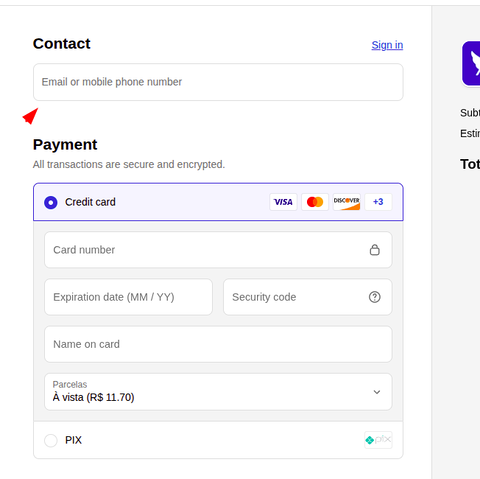
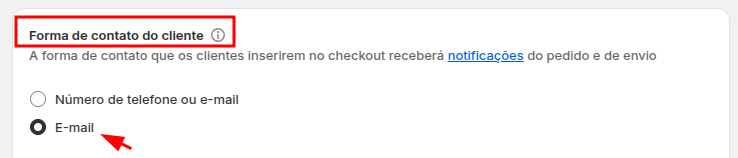
AttentionThis setting is required for Credit Card payments.
If another contact method is enabled, inconsistencies may occur at checkout and the payment may not be processed correctly.
This setting is not a specific requirement of the Boleto or Pix Apps.
Configure Production or Sandbox
When configuring the Asaas Apps, provide a Production API key.
The Sandbox key is optional and should be configured when you want to run test transactions.
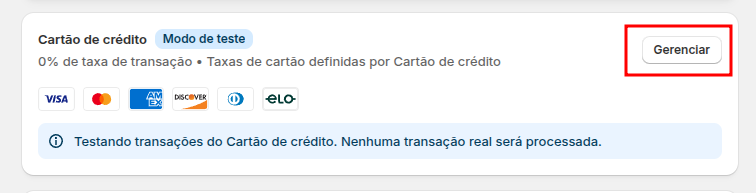
The environment used depends on Test mode:
| Setting | Environment used |
|---|---|
| Test mode disabled | Production |
| Test mode enabled | Sandbox |
To process a transaction in the Sandbox, the app must have a Sandbox API key configured and Test mode enabled.
The images below show this setting in the Credit Card App:
Settings > Payments > Credit Card > Manage

ImportantProduction and Sandbox have independent accounts and API keys.
Enabling Test mode without a valid Sandbox key may cause the transaction to fail.
See how to create and manage API keys.
Validate the configuration
Before making the payment method available to buyers, make a test purchase.
Confirm that:
- the app uses the expected environment;
- the payment method appears at checkout;
- the transaction is processed;
- the order is updated after the payment is confirmed;
- for Credit Card, the checkout is configured to use only email as the contact method.
Changes to Test mode affect only new transactions. Orders and payments already processed are not migrated between Sandbox and Production.
Next steps
Updated 7 days ago