
How to set up your account in the Sandbox
Configure your Sandbox account features
Sandbox settings let you enable features and simulate specific scenarios while developing your integration.
These changes affect only the Sandbox account and do not move real money.
By the end of this guide, you will know how to access the Sandbox settings and enable the features needed for your tests.
Features enabled in the Sandbox are not automatically activated in Production.
To confirm availability in Production, talk to your account manager via WhatsApp at 0800 009 0037 or send an email to [email protected].
When to use it
Use these settings to:
- test features that require enablement;
- reproduce specific scenarios;
- validate subaccount flows;
- validate tokenization and recurring charges;
- test integrations before go-live.
1. Access the settings
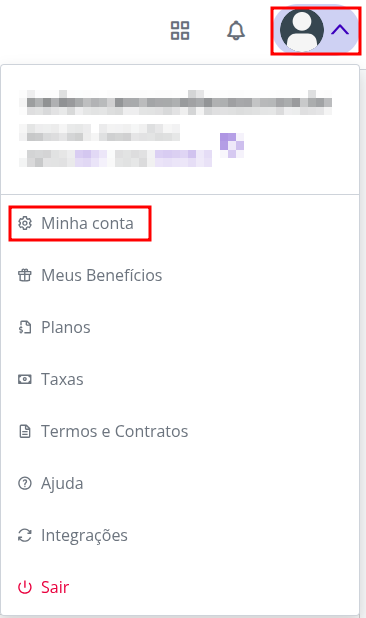
In the Sandbox interface, go to:
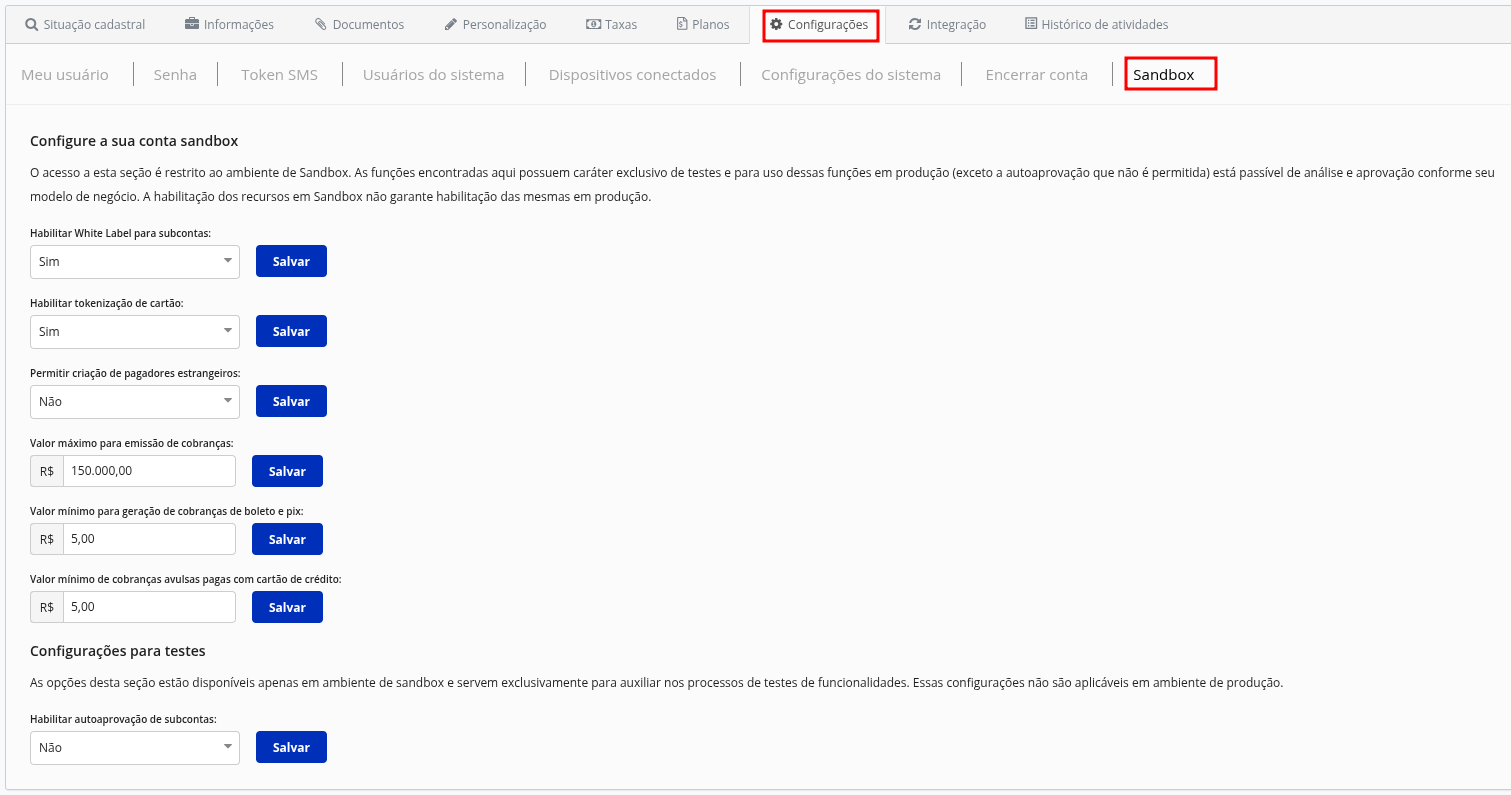
User menu → My account → Settings → Sandbox
2. Enable the necessary features
Settings can be turned on or off at any time.
| State | Behavior |
|---|---|
| Enabled | The feature becomes available for new tests |
| Disabled | The default Sandbox behavior is kept |
Changes affect only the account in which they were made.
Available features
BaaS for subaccounts
Lets you test creating and using subaccounts in a BaaS operation.
Use this setting to validate flows in which your platform creates and manages customer accounts through the API.
Learn more about the evaluation period for BaaS subaccounts.
Card tokenization
Lets you test generating and using card tokens in future charges.
This feature can be used in flows such as:
- subscriptions;
- recurring charges;
- new payments with an already tokenized card.
Learn more about tokenization.
Foreign payers
Lets you create international customers and validate flows with payers from other countries.
Using this feature in Production depends on it being enabled for the account.
Charge limits
Lets you configure limits used in tests, such as:
- minimum amount;
- maximum amount;
- issuance restrictions.
The configured values are for validation testing only.
Subaccount auto-approval
Lets you simulate automatic approval of subaccounts created in the Sandbox.
This option makes it easier to fully test the integration without depending on a manual review.
Auto-approval is a Sandbox simulation and does not represent the approval process applied in Production.
3. Validate the complete flow
To validate an integration with BaaS subaccounts:
- Enable BaaS.
- Turn on subaccount auto-approval.
- Create a subaccount through the API.
- Store the returned API key.
- Perform operations on the subaccount.
- Validate that Webhooks are received.
- Check that your application processed the events correctly.
Enable BaaS
        ↓
Turn on auto-approval
        ↓
Create subaccount
        ↓
Get the API key
        ↓
Run operations
        ↓
Validate WebhooksTurning on a setting does not complete the validation.
Also test the requests, responses, errors, status changes, and Webhooks related to the flow.
Differences between Sandbox and Production
| Feature | Sandbox | Production |
|---|---|---|
| Test settings | Can be turned on through the interface | May require enablement |
| Financial transactions | Does not use real money | Uses real money |
| BaaS | Lets you simulate the flow | Depends on the operation's structure |
| Tokenization | Available for validation testing | May require enablement |
| Foreign payers | Available for testing | Requires enablement |
| Subaccount auto-approval | Can be simulated | Does not represent the real flow |
Before going to Production
Confirm:
- which features need to be enabled;
- whether the critical flows have been validated;
- whether Webhooks are configured;
- whether the application handles errors and status changes;
- whether the Sandbox credentials have been replaced;
- whether any fictitious data remains in the configuration;
- whether the differences between environments have been taken into account.
Next steps
Updated 11 days ago