Retry process (Journey 3 API)

The retry process lets you, as the receiving user (Asaas customer), pursue the settlement of a Pix Automático charge that failed on its original due date by commanding new debit attempts on later dates — within the limits defined by the Central Bank's Pix arrangement.

The goal is to reduce delinquency on recurring charges and increase the settlement rate, without having to create a new charge or a new authorization.

In short

To use retries in Pix Automático:

  1. Create the authorization with retryPolicy = ALLOW_THREE_IN_SEVEN_DAYS.
  2. When an instruction fails on its due date, call the retry endpoint and provide a new dueDate.
  3. The rule allows up to 3 attempts on different dates, within 7 calendar days after the original due date and before the recurrence's next cycle.

The details of each step, validations, and webhooks are covered in the following sections.

Overview

There are two types of retries in Pix Automático. Understanding the difference matters because only the extra-day retry is commanded by you via API.

TypeWho runs itWhen it happensReceiver's action
Intraday — same dayPayer PSP, automaticallyOn the due date itself, if the early-morning window fails. The Payer PSP is required to try at least once more between 6 PM and 9 PM. No attempts are made after 9 PM.None. It is automatic and does not count toward the extra-day attempt limit.
Extra-day — following daysReceiver, via APIAfter the definitive failure on the due date, on later dates. Follows the 3R_7D policy.You command each attempt by calling the retry endpoint.

Note: the mandatory intraday retry, also called the nightly attempt, applies on each extra-day retry date.

Integration flow

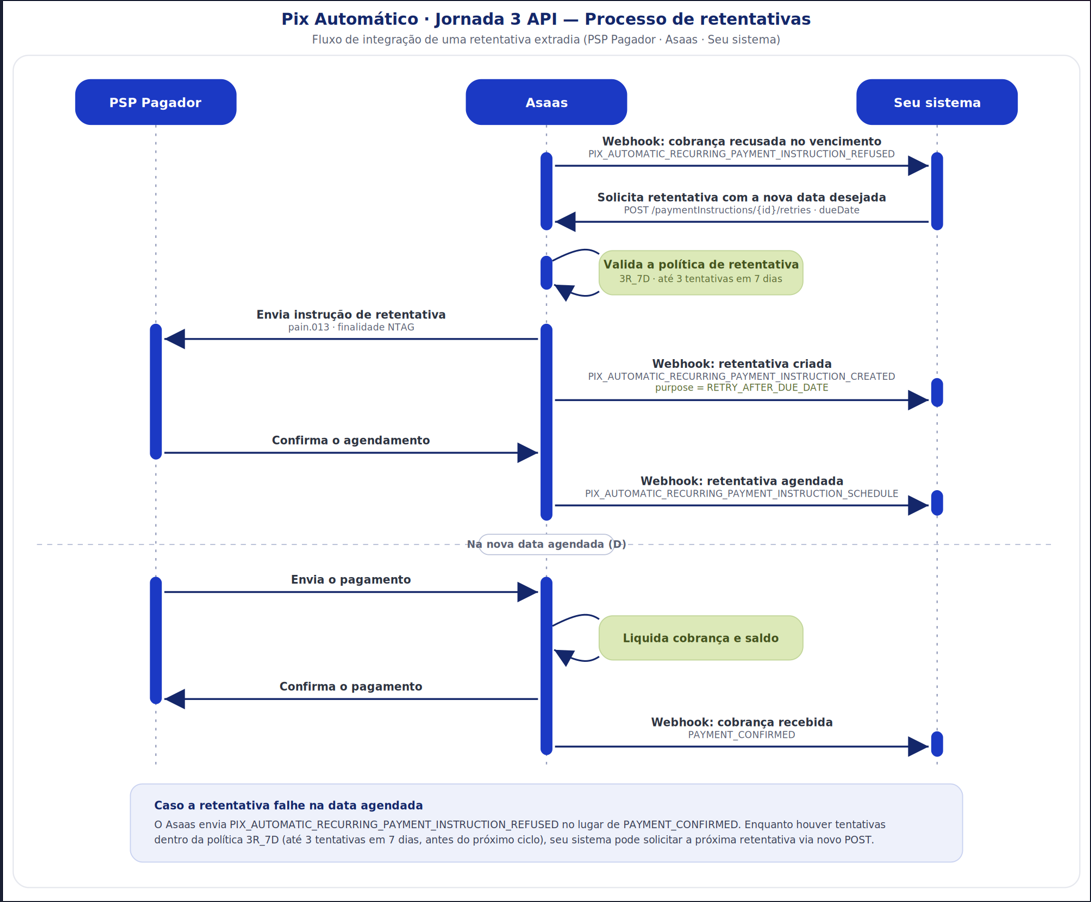
The diagram below summarizes the full journey of an extra-day retry — from the webhook that notifies you of the failure on the due date, through the API call that commands the new attempt, up to settlement.


The steps are detailed in the sections that follow.

The 3R_7D policy

The extra-day retry is governed by the regulatory policy known as 3R_7D:

  • 3R: at most 3 attempts on different dates for the same failed charge.
  • 7D: attempts must occur within 7 calendar days, counted from the original settlement date.
  • The 7-day limit cannot go past the day immediately before the start of the next billing cycle.
  • The amount of each retry must be identical to the original charge.
  • Each retry command must be sent by 11:59 PM on the day before the new expected settlement date.

Example

If the original charge was due on 2026-07-01, extra-day retries can be scheduled for dates within the following 7 calendar days, as long as they neither coincide with nor go past the start of the next cycle.

To attempt settlement on 2026-07-03, the command must be sent by 2026-07-02 at 11:59 PM.

Nomenclature — Bacen × Asaas

3R_7D is the term used by the Central Bank — Bacen — to describe the policy.

In the Asaas API, this same policy is represented by the ALLOW_THREE_IN_SEVEN_DAYS enum, provided in the retryPolicy field.

Whenever this guide mentions 3R_7D, it refers to the policy represented by ALLOW_THREE_IN_SEVEN_DAYS in the integration.

When you enable the policy, Asaas registers the recurrence with retry permission and starts accepting retry instructions for that recurrence's charges.

Important: a recurrence that was not created with the retry policy enabled treats any failure on the due date as a definitive failure.

Retries cannot be enabled afterward. The policy must be configured when the authorization is created.

Step 1 — Enable the policy when creating the authorization

Retry permission is defined when the Pix Automático recurrence is created, through the retryPolicy field, of type string.

{
  "...": "other recurrence-creation fields",
  "retryPolicy": "ALLOW_THREE_IN_SEVEN_DAYS"
}
FieldTypeRequiredDescription
retryPolicystringNoDefines the extra-day retry policy. The supported value is ALLOW_THREE_IN_SEVEN_DAYS, equivalent to Bacen's 3R_7D policy. If omitted, the recurrence is created without retry permission.

Behavior by configuration

  • retryPolicy absent: disabled by default. The recurrence is created without retry permission.
  • retryPolicy = "ALLOW_THREE_IN_SEVEN_DAYS": the recurrence is created with extra-day retry permission.
  • retryPolicy with an invalid value, such as ALLOW_FIVE_IN_TEN_DAYS: creation is rejected with an HTTP 400 error.

Technical information: internally, this configuration is reflected in idRecorrencia.

The second character will be:

  • R: retries are allowed;
  • N: retries are not allowed.

You normally do not need to interpret this field, but it may appear in integrations that read the Pix arrangement messages directly.

Step 2 — Trigger a retry

When a charge fails on its due date and you receive the refused-instruction event, you can schedule a new attempt by providing the desired date for the new debit.

POST /v3/pix/automatic/paymentInstructions/{id}/retries

Request body

{
  "dueDate": "2026-07-03"
}

Parameters

FieldTypeRequiredDescription
id — pathstringYesUnique identifier of the Pix Automático payment instruction in Asaas. It must be the ID of the instruction that failed.
dueDatedate in YYYY-MM-DD formatYesNew desired date for the settlement attempt.

Example response

{
  "id": "{id}",
  "purpose": "RETRY_AFTER_DUE_DATE",
  "...": "other payment-instruction fields"
}

The purpose field identifies the nature of the payment instruction:

  • SCHEDULE: original instruction;
  • RETRY_AFTER_DUE_DATE: retry instruction.

This field lets you distinguish a retry from the original charge.

After accepting the request, Asaas generates a new payment instruction for the Payer PSP with the NTAG scheduling purpose, used for retries due to insufficient balance or limit.

Nomenclature — Bacen × Asaas

NTAG is the scheduling purpose defined by the Central Bank — Bacen — for retries caused by insufficient balance or limit.

In the Asaas API, it corresponds to purpose = RETRY_AFTER_DUE_DATE in the payment instruction.

Both terms represent the same concept from different sides of the integration.

Applied validations

The request is rejected if any of the rules below are violated. Business errors return HTTP status 400.

ValidationHTTP statusReference message
4th attempt, exceeding the 3R limit400“Retry limit exceeded. The rule allows at most 3 attempts.”
Date beyond 7 calendar days from the due date400“The requested date exceeds the 7-calendar-day limit allowed after the original due date.”
Command sent after 11:59 PM on the day before the desired date, such as scheduling for the current day400“The retry scheduling must be sent by 11:59 PM of the day before the desired settlement date.”
Date coincides with or goes past the start of the next cycle400“The retry date cannot coincide with or go past the start day of the recurrence's next cycle.”
Authorization does not allow retries, with policy N400“This charge's authorization does not allow extra-day retries (Policy ‘N’).”

Step 3 — Track retries via webhooks

Retries use the standard Pix Automático payment-instruction event flow.

To distinguish a retry instruction from the original instruction, check the following fields in the event payload:

FieldTypeDescription
purposestringSCHEDULE for the original instruction and RETRY_AFTER_DUE_DATE for a retry.
retryAttemptintegerAttempt number, such as 1, 2, or 3.

Events involved

EventMeaning
PIX_AUTOMATIC_RECURRING_PAYMENT_INSTRUCTION_CREATEDThe retry instruction was created after your request.
PIX_AUTOMATIC_RECURRING_PAYMENT_INSTRUCTION_SCHEDULEDThe Payer PSP accepted the retry scheduling.
PAYMENT_CONFIRMEDThe retry was settled successfully.
PIX_AUTOMATIC_RECURRING_PAYMENT_INSTRUCTION_REFUSEDThe retry failed on the scheduled date or was refused immediately by the Payer PSP.
PIX_AUTOMATIC_RECURRING_PAYMENT_INSTRUCTION_CANCELLEDThe scheduled retry instruction was cancelled.
PIX_AUTOMATIC_RECURRING_AUTHORIZATION_CANCELLEDThe recurrence authorization was cancelled.

Expected sequences

Retry settled successfully

PIX_AUTOMATIC_RECURRING_PAYMENT_INSTRUCTION_CREATED
→ PIX_AUTOMATIC_RECURRING_PAYMENT_INSTRUCTION_SCHEDULED
→ PAYMENT_CONFIRMED

Retry scheduled but refused due to insufficient balance on the scheduled date

PIX_AUTOMATIC_RECURRING_PAYMENT_INSTRUCTION_CREATED
→ PIX_AUTOMATIC_RECURRING_PAYMENT_INSTRUCTION_SCHEDULED
→ PIX_AUTOMATIC_RECURRING_PAYMENT_INSTRUCTION_REFUSED

The charge remains pending or overdue. If attempts are still available under the 3R_7D rule, you can command the next retry.

Retry immediately refused by the Payer PSP

PIX_AUTOMATIC_RECURRING_PAYMENT_INSTRUCTION_CREATED
→ PIX_AUTOMATIC_RECURRING_PAYMENT_INSTRUCTION_REFUSED

In this case, the PIX_AUTOMATIC_RECURRING_PAYMENT_INSTRUCTION_SCHEDULED event is not sent.

Authorization cancellation with a scheduled retry

PIX_AUTOMATIC_RECURRING_AUTHORIZATION_CANCELLED
→ PIX_AUTOMATIC_RECURRING_PAYMENT_INSTRUCTION_CANCELLED

Charge paid through another payment method with an active instruction

PAYMENT_CONFIRMED
→ PIX_AUTOMATIC_RECURRING_PAYMENT_INSTRUCTION_CANCELLED

Cancelling retries

An instruction failure does not cancel the authorization.

If a charge fails on its due date, with or without retries, the authorization remains active and the next charges in the recurrence continue to be generated normally.

No additional action is required on your side.

The receiving user cannot individually cancel a retry instruction that has already been generated.

Once the process starts, you can no longer intervene in that specific charge. The instruction follows the attempt cycle and expires according to the configured policy.

Cancellation only happens indirectly through the cancellation of the authorization, which may be performed:

  • by the payer;
  • by the Payer PSP;
  • by Asaas.

Cancelling the authorization automatically cancels all pending schedules, including extra-day retries from D+1 onward.

If the cancellation commanded by Asaas is sent after 10 PM, only schedules from D+2 onward are cancelled.

Payment through another payment method

The payer can settle the charge through another payment method, such as the invoice link, boleto, or Pix Copy and Paste, up to the day before the due date of an active instruction, whether it is the original instruction or a retry.

When this happens, the automatic instruction for that cycle is cancelled to avoid a duplicate debit.

You receive the following webhook:

PIX_AUTOMATIC_RECURRING_PAYMENT_INSTRUCTION_CANCELLED

Payment through another payment method is blocked only during the critical window:

From 10 PM on D-1 until the due date D.

Recovery after the retry process ends

When all attempts are exhausted without success, you receive the final webhook:

PIX_AUTOMATIC_RECURRING_PAYMENT_INSTRUCTION_REFUSED

At this point:

  • no more attempts are available under the 3R_7D policy;
  • the parent charge remains with the Overdue status;
  • Pix Automático no longer has pending automatic instructions for that charge.

From this point on, you can handle the charge as you would any other overdue charge and continue sending the invoice link, with boleto and Pix Copy and Paste, to the payer.

Because there is no longer a pending automatic instruction, no automatic instruction cancellation will occur when payment is made through another payment method.

Expected states after the process ends

EntityFinal status
Charge — PaymentOverdueOVERDUE
Retry instructionRefused — webhook PIX_AUTOMATIC_RECURRING_PAYMENT_INSTRUCTION_REFUSED
Authorization — recurrenceActive — continues generating the next charges

How to charge through another payment method

  1. Identify the parent charge linked to the failed instruction.

    The PIX_AUTOMATIC_RECURRING_PAYMENT_INSTRUCTION_REFUSED webhook payload contains the link to the charge in the payment field.

    Alternatively, you can navigate from the authorization using the endpoint to retrieve a single Pix Automático authorization, locate the linked subscription, and list its open charges.

  2. Send the invoice link for the charge to the payer.

    Asaas keeps the link active with boleto and Pix Copy and Paste after the retry process ends.

  3. Wait for the payment confirmation.

    When the payer settles the charge through this payment method, you receive the following webhook normally:

    PAYMENT_CONFIRMED

Important: the next charges in the authorization are not affected.

They continue to be generated in the following cycles, regardless of the outcome of this specific charge.

Best practices and notes

  • Reserve the 7-day window when setting the recurrence's end date.
    If you configure an end date, add extra days to the end of the contract so the last charge still has enough time to use the 7 days of the 3R_7D policy.

  • Do not count the intraday attempt as one of your 3 attempts.
    The Payer PSP's mandatory nightly attempt is automatic and independent of the extra-day retries commanded by you.

  • Handle idempotency on your side.
    Avoid concurrent requests to create the same retry. Command one attempt at a time and wait for confirmation through the webhook.

  • Use purpose and retryAttempt for reconciliation.
    These fields let you distinguish the original charge from its retries and define automated actions, such as suspending a service after the third failure.

References