
Webhook Events
Webhook events allow your application to be automatically notified whenever a relevant change occurs in Asaas resources.
Each event represents a state change in a specific product or feature, such as payments, subscriptions, transfers, Checkout, invoices, or Automatic Pix.
This page centralizes the available event categories. The details of each event, their names, and behaviors are presented on the specific pages for each resource.
When to use
Webhook events are recommended when your application needs to be automatically notified about changes occurring in Asaas.
Some examples include:
- updating orders after a payment is completed;
- granting access after a subscription is confirmed;
- synchronizing financial systems;
- tracking transfers;
- monitoring invoice issuance;
- processing Checkout events;
- monitoring Automatic Pix events.
By using Webhooks, there is no need to continuously query the API to check for status changes.
How it works
The flow generally follows the structure below:
An event occurs in Asaas
↓
The Webhook identifies the event
↓
An HTTP POST request is sent
↓
Your application receives the payload
↓
The event is processed
↓
The application returns HTTP 200
Event structure
All Webhooks sent by Asaas have a similar structure:
{
  "id": "evt_05b708f961d739ea7eba7e4db318f621",
  "event": "PAYMENT_RECEIVED",
  "dateCreated": "2024-06-12 16:45:03",
  "payment": {
    "id": "pay_080225913252"
  }
}
The object sent varies according to the event type.
Important behaviors
When working with Webhook events, it is important to consider that:
- notifications are sent through HTTP POST requests;
- delivery follows the at least once model, so the same event may be delivered more than once;
- the application should implement idempotency;
- HTTP responses outside the 2xx family trigger new delivery attempts;
- after several consecutive failures, the queue may be interrupted;
- events remain available for up to 14 days.
Available event categories
Navigate to the specific pages to view the events available in each category.
Payments
Subscriptions
Invoices
Transfers
Bill Payments
Anticipations
Mobile top-ups
Account status
Checkout
Balance blocks
Internal transfers
API keys
Automatic Pix
Best practices
- Configure only the events that are actually required by your application.
- Implement idempotency in event processing.
- Process events asynchronously.
- Monitor Webhook Logs regularly.
- Return HTTP 2xx responses quickly.
- Use authentication through the
asaas-access-tokenheader.
Events in subaccounts
Events in subaccountsYou can also configure Webhooks for your subaccounts. To learn more, see the Subaccounts section.
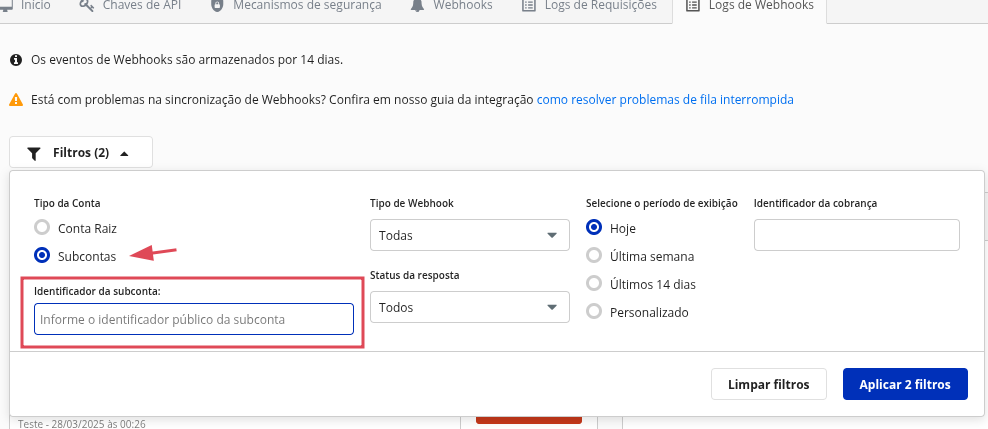
Webhook events will always be available in the interface of the account where they were configured.
In addition, it is possible to filter subaccount events directly from the main account.
Next steps
After selecting the desired category, we also recommend reviewing:
- Receive events from Asaas in your Webhook endpoint;
- How to implement idempotency in Webhooks;
- Delivery types;
- Webhook Logs;
- Queue penalties;
- Paused queue;
- Official Asaas IPs.
Updated 4 months ago