
Automatic Pix offer on API subscriptions
Subscriptions created via API now offer Pix Automático to the payer, without you needing to change the integration of subscriptions you already have.
By completing this guide, you will have created a subscription eligible for the automatic offer, identified the authorization linked to it, and set up webhook tracking.
The goal is to increase the recurrence and predictability of your Pix subscription revenue, without creating a second integration.
AttentionThe automatic offer is available for accounts eligible for Pix Automático. Subscriptions created before the feature became available do not receive the offer. Production release: 10/29/2026.
When to use
Use this offer when:
- your integration creates subscriptions via API with payment by Pix, bank slip, or "Ask the Customer";
- you want the payer to be able to authorize automatic debit of the next charges, without a new integration;
- you want to track the authorization and the debits of the subscriptions through webhooks.
Before you start
Before implementing:
- confirm that the account is eligible for Pix Automático: approved account, approved documents, registered Pix key, and active Pix receipts;
- define whether the offer should be made on all subscriptions or only on some of them, using the field
pixAutomaticAuthorizationMode; - configure the Pix Automático event webhooks that will track the authorization and the charges.
To understand the difference between this journey and Pix Automático with mandatory authorization, see Difference between Pix Automático and Subscriptions.
Conditions for the subscription to receive the offer
The offer is generated when all the conditions below are met.
| Condition | Rule |
|---|---|
| Account | The account must be eligible for Pix Automático. Eligibility changes are notified by the event PIX_AUTOMATIC_RECURRING_ELIGIBILITY_UPDATED. |
Payment method (billingType) | PIX, BOLETO, or UNDEFINED (shown as "Ask the Customer"). Subscriptions with CREDIT_CARD do not receive the offer. |
Frequency (cycle) | WEEKLY, MONTHLY, QUARTERLY, SEMIANNUALLY, or YEARLY. The cycles BIWEEKLY and BIMONTHLY do not receive the offer. |
| Discount | The subscription cannot have a discount (discount) configured, percentage or fixed amount. |
| Authorization mode | The field pixAutomaticAuthorizationMode cannot be set to DISABLED. |
| Creation date | Only subscriptions created from the date the feature became available. |
The offer is presented on the subscription's current charge. Only the current charge is generated with a composed QR Code: if other charges were already created, they keep the standalone QR Code. While the authorization is pending (CREATED), the offer continues on the next charges, until the authorization is activated or ended by the EXPIRED event.
The offer behaves the same way for subscriptions created through the Asaas interface.
A subscription that does not meet the conditions is created normally, without Pix Automático authorization, and its charges follow as regular charges.
How it works
When you create an eligible subscription via API, Asaas:
- creates a Pix Automático authorization linked to the subscription;
- generates the subscription's current charge with a composed QR Code, which combines the charge data and the recurrence's location data;
- after the payer authorizes, automatically sends the payment instructions of the following charges to the payer's bank.
The open charge of the subscription is the one that carries the offer. At creation, it is the first charge. If it is paid without activating Pix Automático or expires, the next charge becomes the current one and receives the composed QR Code.
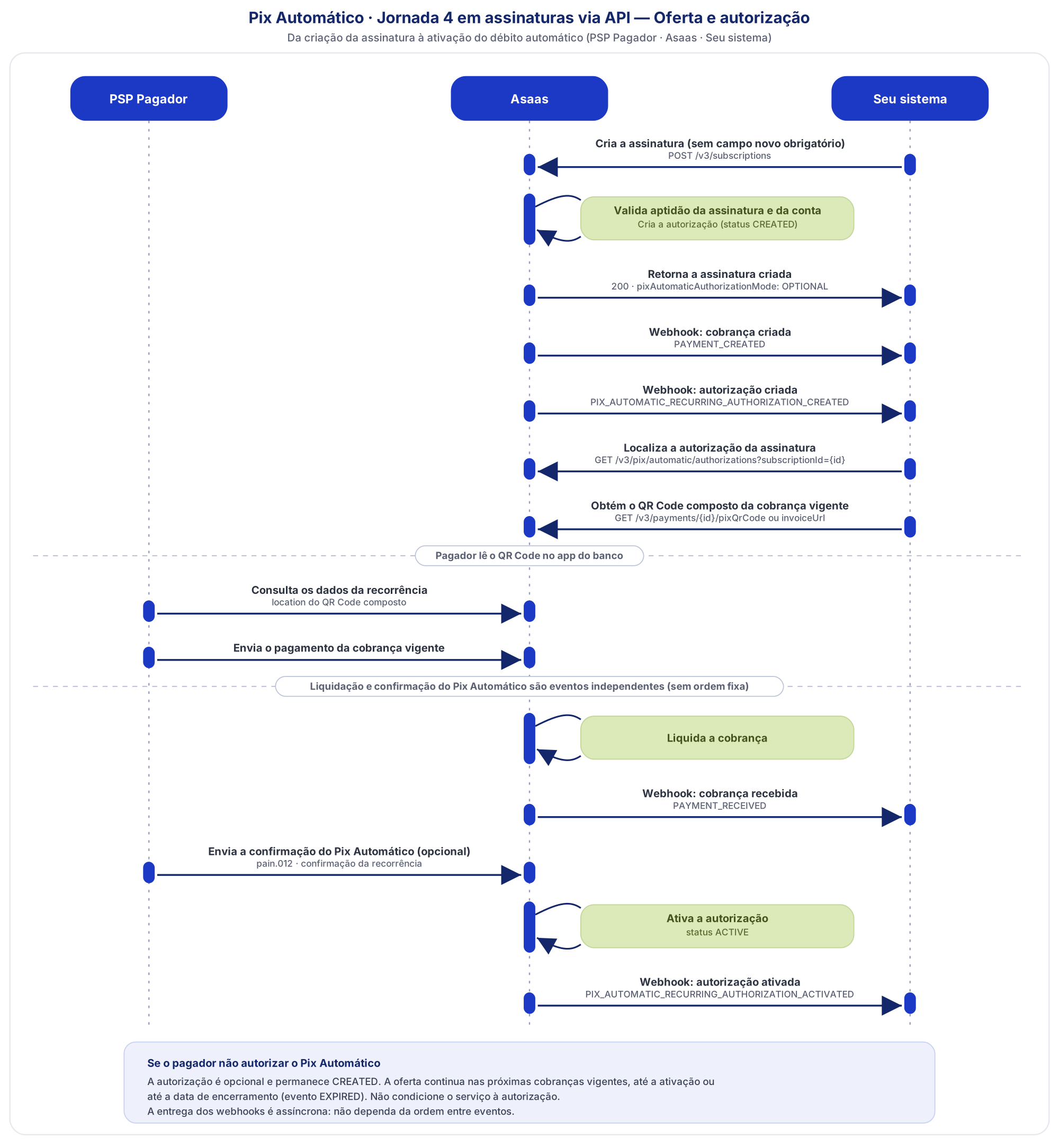
Journey 4 is the term in the Pix Regulation for the flow in which the payer pays or schedules a charge with a due date and, only afterwards, receives the offer to authorize Pix Automático. The Pix arrangement's recurrence corresponds, in the Asaas API, to the Pix Automático authorization. The states CRIADA, APROVADA, CANCELADA and EXPIRADA correspond to the authorization statuses
CREATED,ACTIVE,CANCELLED, andEXPIRED.
| Item | Behavior in your integration |
|---|---|
| Subscription creation request | No new field is required. The optional field pixAutomaticAuthorizationMode allows you to disable the offer on a specific subscription. |
| Current charge QR Code | Still obtained through the invoice or the Pix QR Code endpoint. On the current charge, the payload contains the recurrence location. |
| Authorization | Linked to the subscription and can be queried with the subscriptionId filter in the authorization listing. |
| Following charges | If the authorization is active, they are debited automatically on the due date. If it is still pending (CREATED), the payer pays them as regular charges. |
Difference from Pix Automático with mandatory authorization
| Automatic offer on subscriptions (Journey 4) | Mandatory authorization (Journey 3) | |
|---|---|---|
| Charge that carries the offer | Current charge, with a due date, which can be paid or scheduled | Immediate payment |
| Authorization | Optional, offered after payment or scheduling | Mandatory, granted together with the payment |
| How to enable | Automatic on eligible subscriptions | See the Pix Automático implementation guide |
1. Create the subscription
Use the same endpoint as Create new subscription: POST /v3/subscriptions. To receive the offer, you do not need to send any new field.
{
  "customer": "cus_000005219613",
  "billingType": "PIX",
  "value": 89.90,
  "nextDueDate": "2026-12-10",
  "cycle": "MONTHLY",
  "description": "Monthly plan",
  "externalReference": "subscription-123"
}
To disable the offer on this subscription, send the field with the value DISABLED:
{
  "customer": "cus_000005219613",
  "billingType": "PIX",
  "value": 89.90,
  "nextDueDate": "2026-12-10",
  "cycle": "MONTHLY",
  "pixAutomaticAuthorizationMode": "DISABLED"
}| Field | Type | Required | Description |
|---|---|---|---|
pixAutomaticAuthorizationMode | string | No | Pix Automático offer mode on the subscription. Accepted values: OPTIONAL (default) and DISABLED. |
The other parameters follow the reference for Create new subscription.
The creation response includes the field pixAutomaticAuthorizationMode with the subscription's effective mode. OPTIONAL indicates that the offer was generated; DISABLED indicates that it was not, either because it was explicitly sent or because the subscription is ineligible.
Response with the field omitted and an eligible subscription:
{
  "object": "subscription",
  "id": "sub_vsqwcqmdykq5tm2l",
  "dateCreated": "2026-11-06",
  "customer": "cus_000009547456",
  "paymentLink": null,
  "value": 10.00,
  "nextDueDate": "2026-12-11",
  "cycle": "WEEKLY",
  "description": null,
  "billingType": "UNDEFINED",
  "deleted": false,
  "status": "ACTIVE",
  "externalReference": null,
  "checkoutSession": null,
  "sendPaymentByPostalService": false,
  "fine": { "value": 0.00, "type": "FIXED" },
  "interest": { "value": 0.00, "type": "PERCENTAGE" },
  "split": null,
  "pixAutomaticAuthorizationMode": "OPTIONAL"
}
The field takes effect from the subscription creation: if it is sent when updating the subscription, it is ignored.
AttentionSend
OPTIONALexplicitly only when the Pix Automático offer is essential to your flow. If your integration creates subscriptions with varied settings, leave the field out: ineligible subscriptions are created without error.
Validations
| Situation | HTTP status | code | description |
|---|---|---|---|
OPTIONAL and frequency not allowed | 400 | invalid_object | The subscription frequency is not allowed for Pix Automático recurrences. |
OPTIONAL and subscription with discount | 400 | invalid_object | Pix Automático cannot be used on subscriptions with a configured discount. |
OPTIONAL and payment method not allowed | 400 | invalid_object | Pix Automático is only available for subscriptions with Pix or "Ask the Customer" charges. |
OPTIONAL and account not eligible for Pix Automático | 400 | invalid_object | You do not have permission to use this feature. Contact your account manager. |
Value other than OPTIONAL or DISABLED | 400 | parse_error | The field 'pixAutomaticAuthorizationMode' provided is invalid. |
In all cases the subscription is not created. Error response format:
{
  "errors": [
    {
      "code": "invalid_object",
      "description": "Pix Automático cannot be used on subscriptions with a configured discount."
    }
  ]
}
2. Make the current charge available to the payer
The subscription's charges are obtained as for any subscription, through List charges of a subscription (GET /v3/subscriptions/{id}/payments), where {id} is the subscription identifier returned in Step 1. At creation, the current charge is the first one.
To present the payment to the payer, use one of the options you already use:
- the charge's invoice link (
invoiceUrl); or - the Get Pix QR Code for payments endpoint (
GET /v3/payments/{id}/pixQrCode), where{id}is the charge identifier.
On subscriptions with the offer, the current charge's QR Code payload is a composed QR Code. The other charges created keep the standalone QR Code. You do not need to choose the format: Asaas returns the composed QR Code on the current charge and the standalone one on the others. No new field is returned. The payer's bank reads the QR Code, processes the payment or scheduling, and at the end presents the Pix Automático offer.
AttentionDo not build the QR Code manually and do not validate the size or internal structure of the payload. Pass to the payer exactly the content returned by Asaas.
3. Identify the authorization linked to the subscription
Use List authorizations with the subscriptionId filter to find the Pix Automático authorization generated for the subscription: GET /v3/pix/automatic/authorizations?subscriptionId={subscriptionId}.
| Query parameter | Type | Required | Description |
|---|---|---|---|
subscriptionId | string | No | Subscription identifier in Asaas, returned when the subscription is created (Step 1). |
The status and customerId filters, and offset and limit pagination, remain available and can be combined with subscriptionId.
Example listing response:
{
  "object": "list",
  "hasMore": false,
  "totalCount": 1,
  "limit": 10,
  "offset": 0,
  "data": [
    {
      "id": "f491dd86-c552-4468-9d9b-ad0eda4c0aa0",
      "contractId": "1619468",
      "customerId": "cus_000009547456",
      "frequency": "WEEKLY",
      "startDate": "2026-11-06",
      "status": "CREATED",
      "value": 10.00,
      "originType": "PAYMENT_AND_RECURRING_OFFER_QR_CODE",
      "subscriptionId": "sub_vsqwcqmdykq5tm2l",
      "paymentCreationMode": "SUBSCRIPTION",
      "retryPolicy": "NOT_ALLOWED"
    }
  ]
}| Field | Description |
|---|---|
id | Authorization identifier. Use it to relate webhook events and payment instructions to the subscription. |
status | Current authorization status. Right after the subscription is created, the status is CREATED. |
subscriptionId | Subscription that originated the authorization. |
originType | Authorization origin. The value PAYMENT_AND_RECURRING_OFFER_QR_CODE identifies authorizations generated by the automatic offer on subscriptions. |
paymentCreationMode | How the authorization's charges are created. On subscription authorizations, the value is SUBSCRIPTION. |
retryPolicy | Debit retry policy. On subscription authorizations, the value is NOT_ALLOWED. |
RecommendedStore the
subscriptionId↔authorization.idpair in your system. Payment instruction events carrypaymentInstruction.authorization.idandpaymentInstruction.paymentId, and these identifiers are how you reconcile each automatic debit with the subscription and the charge.
4. Track the authorization and the debits through webhooks
Enable the Pix Automático events in addition to the charge events your integration already consumes. It is not necessary to query the authorization listing periodically.
ImportantWebhook delivery is asynchronous and the order between events is not guaranteed. Do not rely on order and use
authorization.id,subscriptionId, andpaymentIdto correlate the events.
Authorization events
| Event | When it occurs in this journey |
|---|---|
PIX_AUTOMATIC_RECURRING_AUTHORIZATION_CREATED | The authorization is created for the eligible subscription. |
PIX_AUTOMATIC_RECURRING_AUTHORIZATION_ACTIVATED | Asaas received the Pix Automático confirmation message from the payer's institution. It is independent of the charge settlement. |
PIX_AUTOMATIC_RECURRING_AUTHORIZATION_REFUSED | Not issued in Journey 4. It only occurs in Journey 3. |
PIX_AUTOMATIC_RECURRING_AUTHORIZATION_CANCELLED | The authorization was cancelled by the payer, by you, or as a result of a subscription change. The reason is provided in authorization.cancellationReason. |
PIX_AUTOMATIC_RECURRING_AUTHORIZATION_EXPIRED | The authorization reached its end date, including when the payer never activated it. |
Payment instruction events
| Event | When it occurs |
|---|---|
PIX_AUTOMATIC_RECURRING_PAYMENT_INSTRUCTION_CREATED | The debit instruction for a subscription charge is created. |
PIX_AUTOMATIC_RECURRING_PAYMENT_INSTRUCTION_SCHEDULED | The payer's institution scheduled the debit for the due date. |
PIX_AUTOMATIC_RECURRING_PAYMENT_INSTRUCTION_REFUSED | The instruction was refused at scheduling or processing. |
PIX_AUTOMATIC_RECURRING_PAYMENT_INSTRUCTION_CANCELLED | The instruction was cancelled. |
Each charge's financial confirmation is still reported by the charge events (PAYMENT_CONFIRMED and PAYMENT_RECEIVED).
Expected sequences
Payer pays the current charge and authorizes Pix Automático
PAYMENT_CREATED (current charge)
↓
PIX_AUTOMATIC_RECURRING_AUTHORIZATION_CREATED
↓
PAYMENT_RECEIVED and PIX_AUTOMATIC_RECURRING_AUTHORIZATION_ACTIVATED
(no fixed order between the two)
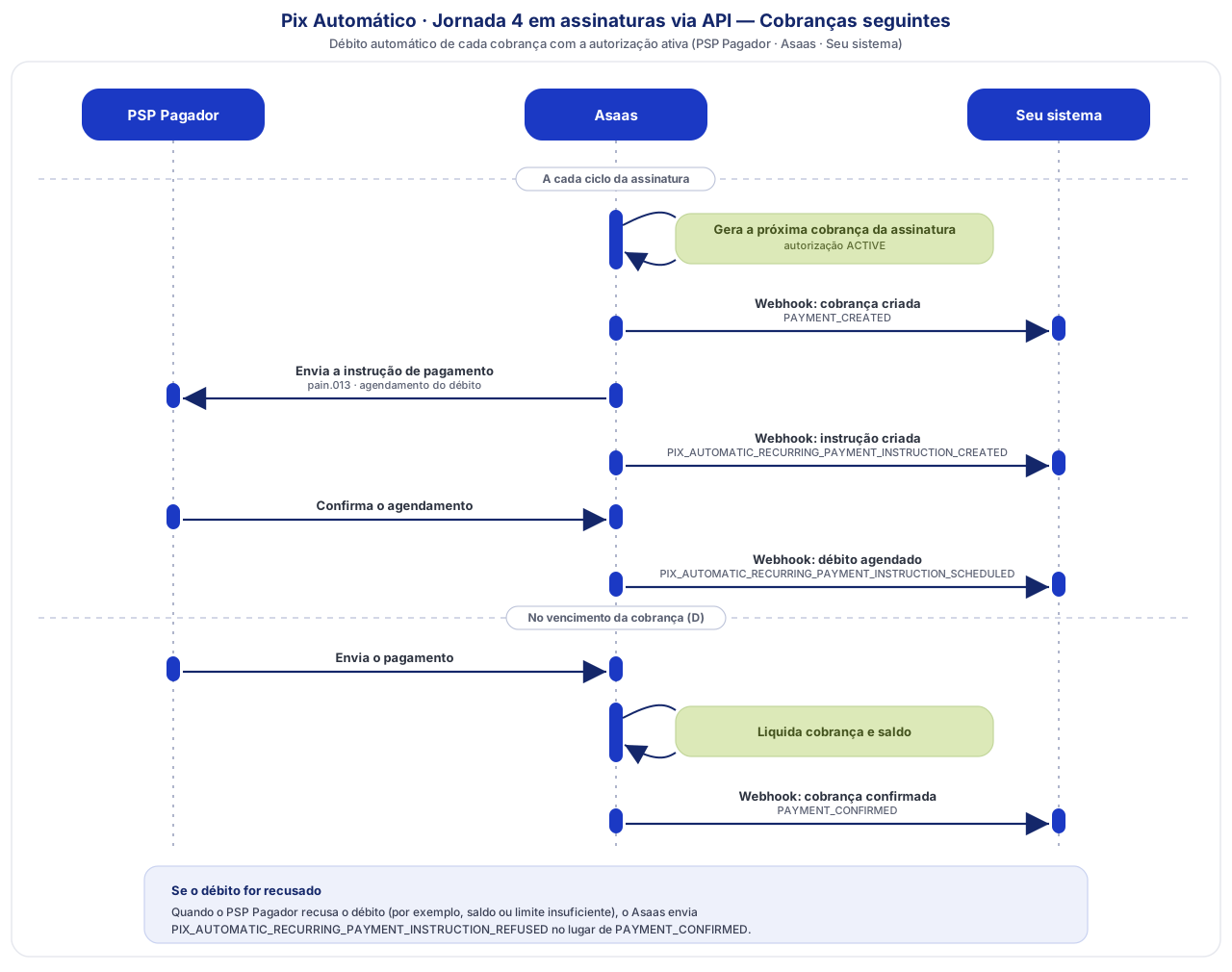
Following charges with active authorization
PAYMENT_CREATED
↓
PIX_AUTOMATIC_RECURRING_PAYMENT_INSTRUCTION_CREATED
↓
PIX_AUTOMATIC_RECURRING_PAYMENT_INSTRUCTION_SCHEDULED
↓
PAYMENT_CONFIRMED
Debit refused due to insufficient balance or the payer's limit
PAYMENT_CREATED
↓
PIX_AUTOMATIC_RECURRING_PAYMENT_INSTRUCTION_CREATED
↓
PIX_AUTOMATIC_RECURRING_PAYMENT_INSTRUCTION_SCHEDULED
↓
PIX_AUTOMATIC_RECURRING_PAYMENT_INSTRUCTION_REFUSED
In Journey 4 there is no automatic debit retry. Retries are disabled by default (retryPolicy = NOT_ALLOWED). After INSTRUCTION_REFUSED, the charge stays pending and can be paid separately.
Payer pays the current charge without authorizing
PAYMENT_CREATED (current charge)
↓
PIX_AUTOMATIC_RECURRING_AUTHORIZATION_CREATED
↓
PAYMENT_RECEIVED (current charge)
The authorization stays CREATED and the offer continues on the next charges.
Authorization that is never activated
PIX_AUTOMATIC_RECURRING_AUTHORIZATION_CREATED
↓
(authorization stays CREATED while the offer is renewed on the current charges)
↓
PIX_AUTOMATIC_RECURRING_AUTHORIZATION_EXPIRED (on the end date)
Payer cancels the authorization after it was activated
PIX_AUTOMATIC_RECURRING_AUTHORIZATION_ACTIVATED
↓
PIX_AUTOMATIC_RECURRING_AUTHORIZATION_CANCELLED
Charge changed while the authorization is active
(charge changed)
↓
PIX_AUTOMATIC_RECURRING_PAYMENT_INSTRUCTION_CANCELLED
Only that charge's instruction is cancelled. The authorization remains active.
See the cancellationReason values in Pix Automático authorization cancellation reasons.
AttentionChanges to essential subscription fields may cancel the authorization. With the authorization
CREATEDorACTIVE, changingvalue,cycle,nextDueDate,billingType(except fromUNDEFINEDtoPIX), or deactivating the subscription cancels the authorization. Changing interest, fine, or discount cancels only if the authorization isCREATED. Before changing a subscription with an active authorization, check the impact: if the authorization is cancelled, the payer will need to pay the charges manually.
Confirm the result
After creating an eligible subscription, check:
- the creation response shows
pixAutomaticAuthorizationMode=OPTIONAL; - the current charge returns the composed QR Code and the payer can see the offer when paying or scheduling;
- the authorization listing, filtered by
subscriptionId, returns the authorization with statusCREATED; - the
PIX_AUTOMATIC_RECURRING_AUTHORIZATION_CREATEDevent is received by your webhook.
Final state of each scenario:
| Scenario | Subscription | First charge | Authorization | Following charges |
|---|---|---|---|---|
| Payer pays or schedules the current charge and authorizes | Active | Paid | ACTIVE | Debited automatically on the due date |
| Payer pays the first charge without authorizing | Active | Paid | CREATED | Regular charges, paid by the payer. The offer continues until the authorization is activated or ended (EXPIRED) |
| Payer does not pay the first charge | Active | Overdue | CREATED | The next charge becomes the current one and receives the composed QR Code |
| Payer cancels the authorization | Active | Paid | CANCELLED | Regular charges, paid by the payer |
| You cancel the authorization | Active | Paid | CANCELLED | Regular charges, paid by the payer |
| You change an essential subscription field | Active | Depends on payment | CANCELLED | Regular charges, paid by the payer |
| You remove the subscription | Removed | Depends on payment | CANCELLED | Not generated |
Best practices
- Do not condition service delivery on the authorization. Payment of the charge must not depend on joining Pix Automático. A payer who pays without authorizing is in good standing.
- Do not assume every subscription has an authorization. Ineligible subscriptions, those set to
DISABLED, or those from ineligible accounts do not generate an authorization. Confirm via thepixAutomaticAuthorizationModefield in the response, the listing withsubscriptionId, or thePIX_AUTOMATIC_RECURRING_AUTHORIZATION_CREATEDevent. - Use the QR Code returned by Asaas. Only the current charge comes with the composed QR Code. On the other charges, the QR Code is standalone.
- Track through webhooks, without depending on order. Use authorization events to know when automatic debit becomes effective and charge events for financial confirmation.
- Implement idempotency. Webhooks follow an at-least-once delivery model. Persist the event
idbefore processing. See How to implement idempotency in Webhooks. - Pass the QR Code through unchanged. The composed QR Code is larger than a common dynamic QR Code. Do not validate its size or payload structure.
- Guide your payers. The offer appears in the payer's bank app at the end of paying or scheduling the current charge. While the authorization is not activated, it reappears on the next current charges.
- Test in the Sandbox. You can test the offer in the Sandbox by paying the composed QR Code from one Asaas account to another, which is the simplest way.
API reference
API referenceSee the endpoints Create new subscription, List authorizations, and Cancel an authorization in the Reference.
Next steps
Updated 1 day ago